
Interactive games for TikTok LIVE. Your viewers play, you host.
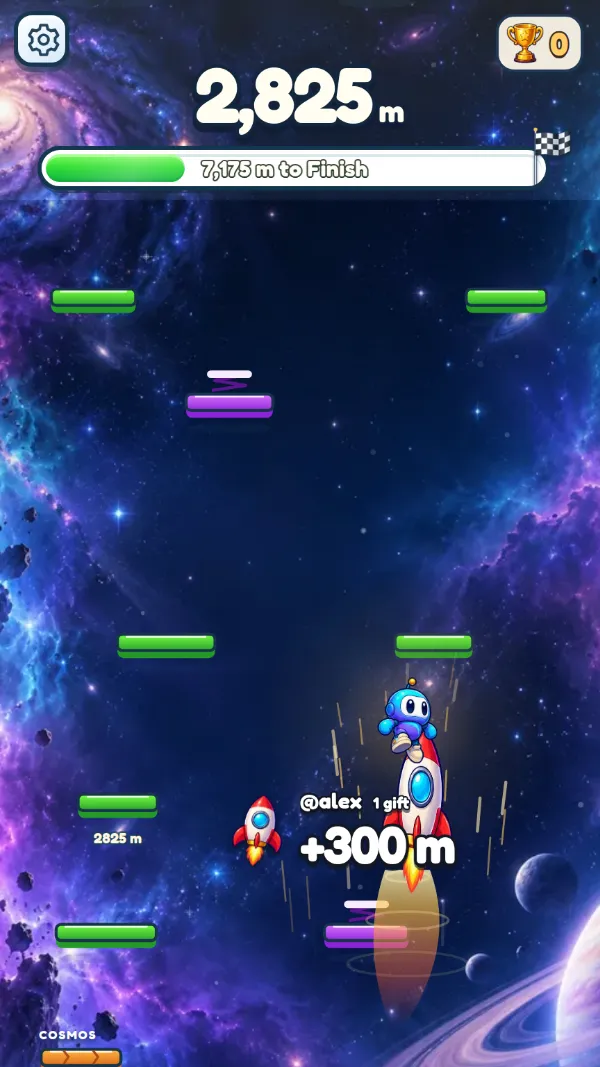
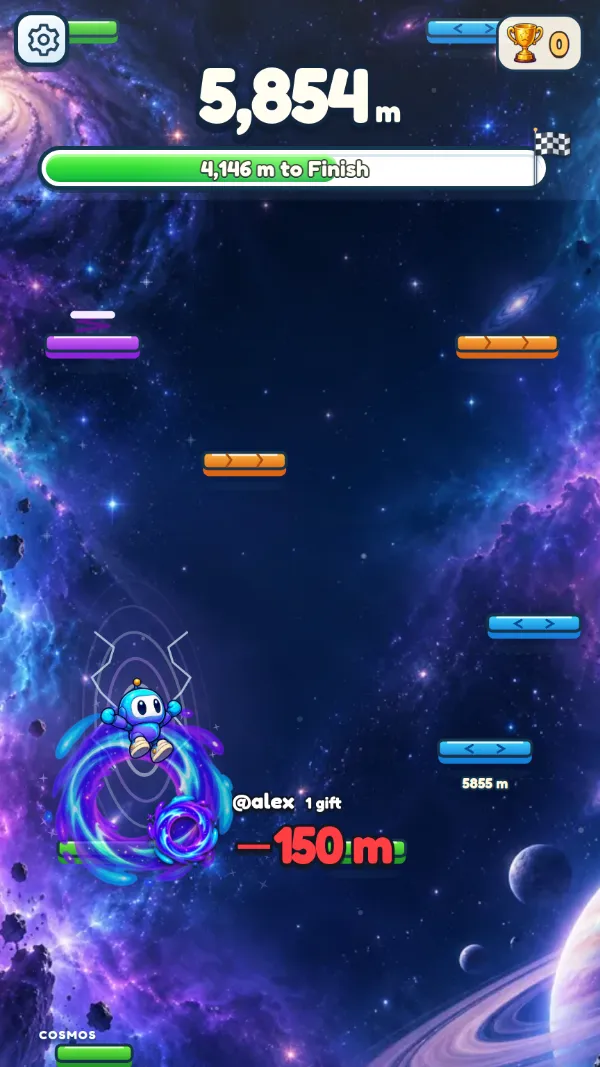
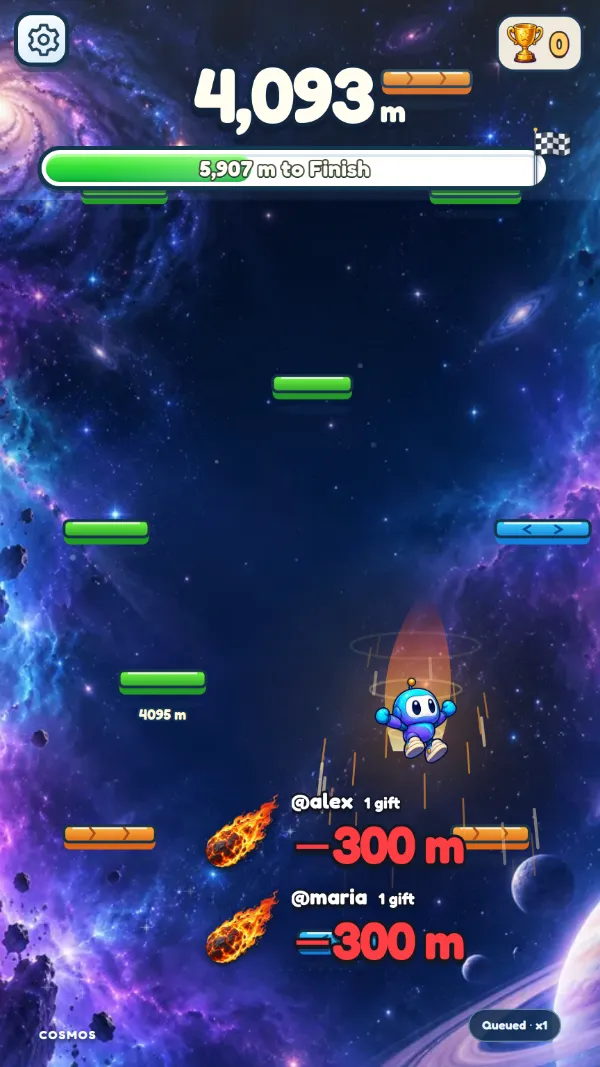
In an interactive TikTok LIVE game, every gift, like and comment from your viewers does something on screen. A Rose lifts the climber, a Galaxy sends it back to the start. Watching turns into playing, and your audience stays to see what happens next.
 Live now
Free to start
SkyShift
Climb to 10,000 meters while viewers push you up or knock you down.
Live now
Free to start
SkyShift
Climb to 10,000 meters while viewers push you up or knock you down.
From a gift to a move on screen
A viewer sends a gift
Any TikTok gift, from a 1-coin Rose to a Lion, or a like, a follow or a word in chat.
LiveArcadeHub reads it
It matches the gift to the rule you set: this gift, this effect, this sound.
The game reacts on your LIVE
Everyone watching sees the effect, with the viewer's name on it.
Not only gifts
Each action can start from up to ten triggers, so viewers who never send a gift can still play.
- One or more gifts, like a Rose or a Galaxy: small gifts for small moves, rare gifts for big moments.
- Any gift above a price, for example every gift of 10 coins or more.
- Likes, counted together: every 20 likes, say, lifts the climber a little.
- Follows, shares and joins of your LIVE.
- A word in the chat, such as “jump”.
Start with SkyShift
SkyShift is a climbing game made for TikTok LIVE. The climber heads for the finish at 10,000 meters, or climbs without end if you turn the finish off. Balloons, clouds and rockets carry it up; anvils, meteors and vortexes drag it down; one gift can even send the whole run back to the start.
At the end of each round an MVP card shows the top gifters and the biggest saboteur, so supporters get their moment on your LIVE.
Three things, and ten minutes
Viewers need nothing new: they play from the TikTok app they already use.
A TikTok account that can go LIVE
TikTok decides who can go LIVE and receive gifts.
TikTok LIVE Studio or OBS
On a Windows PC. The game is a window you capture like any other.
A free LiveArcadeHub account
Use the Windows app or the browser, and change your setup from your phone, even during a LIVE.
Pick a game
Open the app on Windows or in your browser and choose SkyShift.
Set your gifts
Decide what each gift does and press ▶ Test to see it in the game, no LIVE needed.
Add it to LIVE Studio
One Window capture for the game, and your overlay as a link if you want one.
Go LIVE
Type your TikTok ID once. The app connects by itself whenever you go LIVE with your game or overlay open.
About TikTok LIVE games
What is an interactive TikTok LIVE game?
A game you show on your TikTok LIVE that your viewers control. Gifts, likes, follows, shares and chat words each trigger something on screen, so watching turns into playing.
Do my viewers need to install anything?
No. Viewers watch your LIVE and send gifts, likes and comments in the TikTok app as they always do. Only you, the creator, use LiveArcadeHub.
Are TikTok LIVE games free?
You can start for free on LiveArcadeHub: every game action of every game plus 3 custom gift rules per game. Arcade Pass raises that to 10 rules per game and adds auto-steer.
Do I need TikTok LIVE Studio or OBS?
Either works. The game opens in its own window: add it in TikTok LIVE Studio as a Window capture, or in OBS the same way. The overlay is a link you add as a Link in LIVE Studio or a Browser source in OBS.
Can a game get my LIVE restricted?
TikTok decides on restrictions, and no tool can lift one. Games stay safe when you are on camera and talking, keep the gift legend small, never offer money or prizes for gifts, and use no copyrighted music. The guide lists every habit that helps.
Is LiveArcadeHub part of TikTok?
No. LiveArcadeHub works with TikTok LIVE but is an independent product, not affiliated with or endorsed by TikTok Ltd.